
Kubernetes Pods Explained – How They Work and Why They Matter for Microservices

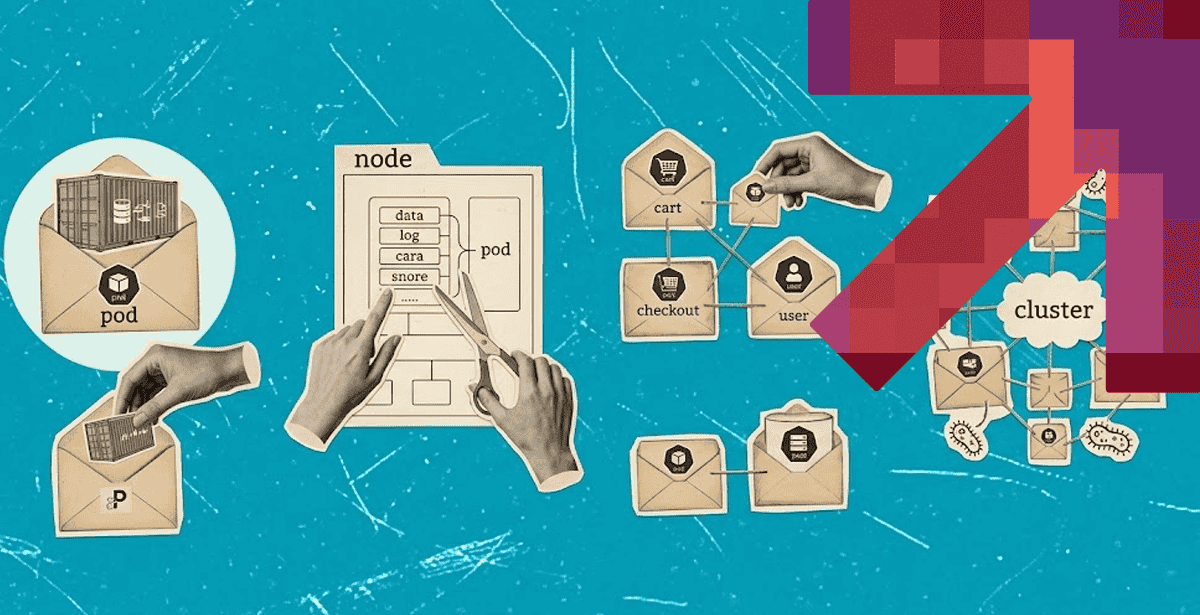
Every microservices deployment comes down to one question. How does a cluster actually run your code? The answer starts with Kubernetes pods.
A pod is the smallest deployable unit in Kubernetes. It is the building block every higher-level object depends on, from deployments to services.
Teams that skip past pods often misdiagnose problems later. Understanding pods first makes everything else in Kubernetes click into place.
What Are Kubernetes Pods?
Kubernetes pods are the smallest deployable unit you can create in Kubernetes. A pod wraps one or more containers that share the same network and storage.
Most pods run a single container. Some run a main container alongside a helper “sidecar,” such as a log shipper or a proxy.
Containers in the same pod always run on the same node. They never get split across two machines.
This shared context is what makes pods useful. Two containers in one pod can talk over localhost. They can also share a mounted volume with no extra setup.
That simplicity is deliberate. Kubernetes wanted a unit small enough to schedule easily, but rich enough to model real application patterns.
How Pods Work Inside a Kubernetes Cluster
A Kubernetes cluster is a set of nodes running your workloads under one control system. Pods are the unit that actually lands on those nodes.
You describe the pods you want. The cluster finds them a home, starts their containers, and keeps them running.
That declarative model is the whole point. You state the desired outcome, and Kubernetes handles the mechanics behind it.
Pod Scheduling and Placement
The scheduler decides which node runs each pod. It weighs CPU requests, memory requests, node capacity, and any affinity rules you set.
Once scheduled, a pod is bound to that node. It stays there for its entire lifecycle, by design.
If the node fails, the pod does not move on its own. A higher-level controller has to notice the failure first.
That distinction matters in practice. Raw pods are not self-healing, which is why production workloads run through a controller instead.
Networking and Storage Inside a Pod
Every pod gets its own IP address inside the cluster network. All containers in that pod share this one IP.
Because they share an IP, containers in a pod must coordinate ports carefully. Two containers cannot both bind port 8080.
Storage follows the same shared model. A volume defined at the pod level can mount into every container inside it.
This is exactly how sidecar patterns work in practice. The main container writes logs to a shared volume, and the sidecar ships them out.
Kubernetes Architecture and Where Pods Fit
Kubernetes architecture splits work between a control plane and worker nodes. Pods live on worker nodes, but the control plane decides how they run.
According to the official Kubernetes documentation, every pod moves through a defined lifecycle. It goes from Pending, to Running, to Succeeded or Failed.
The control plane tracks this lifecycle continuously. Nothing about pod state is left to chance or guesswork.
Control Plane Components
The API server is the front door for every pod request. Every command you run passes through it first.
The scheduler assigns pods to nodes. The controller manager keeps actual state matching what you asked for.
Etcd stores all of this configuration data. It is the cluster’s source of truth for pod and node state.
None of these components run your application code directly. They exist purely to keep the right pods running, in the right place.
Node-Level Components
Each worker node runs a kubelet. This agent starts, stops, and monitors the pods assigned to that specific node.
The kubelet reports pod health back to the control plane constantly. Silence from a node is itself a signal something is wrong.
A container runtime, such as containerd, does the actual work. It pulls images and runs containers on the kubelet’s instructions.
The kubelet decides what to run. It never decides where a pod should be placed in the first place.
Kubernetes Orchestration: Why Pods Need It
Kubernetes orchestration turns a pile of pod definitions into a resilient system. Orchestration means the cluster constantly checks running state against desired state.
Without orchestration, a crashed pod just stays crashed. Nobody notices until a user complains or a dashboard alerts.
With orchestration, a controller notices the failure immediately. It launches a replacement pod, often within seconds.
Self-Healing and Auto-Scaling
Deployments and ReplicaSets are the controllers most teams use for pods. They maintain a target pod count at all times.
When a pod fails, these controllers replace it automatically. That automatic replacement is the self-healing behavior Kubernetes is known for.
Horizontal Pod Autoscalers extend this idea further. They watch CPU, memory, or custom metrics in real time.
As demand rises or falls, the autoscaler adjusts pod count to match it. No human has to intervene during normal traffic swings.
DPL’s own air-gapped Kubernetes deployment for a national defense client leans on exactly this pattern. Over 100 microservices run as pods behind self-healing controllers.
The result: mean time to recovery stays under five minutes. That number holds even with zero external connectivity.
Kubernetes Management for Multi-Pod Microservices
Kubernetes management gets harder as pod count grows. A single microservice might need only a handful of pods.
A full platform, though, can run thousands of pods across dozens of services. Management practices that work at ten pods often break at a thousand.
Good practice starts with explicit resource requests and limits on every pod. Guessing at these numbers causes noisy-neighbor problems later.
Consistent labeling matters just as much. Labels are how services, autoscalers, and dashboards all find the right pods.
Namespaces add another layer of order. They separate teams or environments cleanly, without needing separate clusters.
💡Choose your deployment strategy based on risk and recovery needs. The right Kubernetes deployment strategy depends on how much downtime your application can tolerate, how quickly you need to roll back, and whether you can test new versions alongside the existing release. Rolling, blue-green, and canary deployments each offer different tradeoffs between speed, infrastructure cost, and release risk, so the strategy should match your workload rather than follow a one-size-fits-all approach.
Kubernetes Services and Pod-to-Pod Communication
Pods are ephemeral by design. They get replaced often, and each replacement gets a brand-new IP address.
That churn makes direct pod-to-pod networking unreliable. You cannot hardcode an IP address and expect it to last.
Kubernetes services solve this problem directly. A service gives a stable virtual IP and DNS name to a group of pods.
Traffic sent to that service gets load-balanced automatically. It only reaches pods that are currently healthy and ready.
This is the mechanism behind service-to-service calls in microservices. One service calls another by name, never by a specific pod’s IP.
That abstraction is foundational to real container orchestration at scale. Without it, every pod restart would break every caller.
Why Pods Matter for Microservices Architectures
Microservices architectures split an application into many small services. Each service typically maps to one or more pods.
This creates a direct cause-and-effect chain. Independent pods enable independent deployments, and independent deployments enable release speed.
That release speed is the entire reason teams adopt microservices. Without pod-level independence, the architecture loses its main advantage.
The 2025 CNCF Annual Cloud Native Survey found that production use of Kubernetes has reached 82% among surveyed organizations. Pod-based orchestration is now the default, not the exception.
Without pods as the deployment unit, teams would manage containers by hand again. That is the exact burden Kubernetes orchestration was built to remove. The work of consultants usually starts here. Getting the pod-level foundation right comes before layering CI/CD on top.
💡Measure DevOps by delivery outcomes, not tool count. Effective DevOps consulting services should improve measurable outcomes such as deployment frequency, lead time for changes, failure rates, and mean time to recovery. The right partner should assess your existing development and operations workflows, identify bottlenecks, and recommend automation and process improvements that make releases faster without sacrificing reliability or security.
Bringing It Together
Kubernetes pods are simple in concept. One or more containers, sharing network and storage, is all a pod really is.
Yet pods carry the entire weight of how a cluster runs workloads. Every deployment, service, and autoscaler ultimately points back to them.
For teams building microservices, pod design pays off at every layer above it. That includes cleaner scaling, faster recovery, and simpler Kubernetes management as the platform grows.
If your team is planning a move to container orchestration, DPL’s cloud and DevOps services can help. The same is true if you are troubleshooting pod-level issues in production. We have run Kubernetes at national-defense scale, and we design cluster architecture that holds up under real traffic.

Topics
Related Articles
-
7 Processes Your Team Should Automate First with DevOps Automation Services
31-Aug-2026 Hazar Hayat
-
Architecture Decisions That Determine Long-Term Cost and Scale in Application Development for Cloud
27-Aug-2026 Hazar Hayat
-
Kubernetes vs Docker – Choosing the Right Tool for Containerized Applications
21-Aug-2026 Hazar Hayat